Aerodrums 2 software update
Posted: Wed Mar 18, 2026 4:23 pm
Hi Aerodrummers
We’re really pleased to roll out a whole host of new features today, as part of our latest Aerodrums 2 software update. Here's an overview of what we've added to the Aerodrumming experience in this update:
Cymbal choking support
We’ve seen lots of Aerodrummers having fun with cymbal choking using Aerodrums 1. Thanks for your patience while we figured out the tech to make this possible in Aerodrums 2!
You can now choke crashes and china cymbals by bringing either drumstick marker to the back of the cymbal, roughly where it would end up if you were to choke the cymbal using your hand.
Choking is enabled by default but can be disabled from Configuration → General.
So, now is the time to perfect that Eye Of The Tiger intro! Watch a demo of cymbal choking on Aerodrums 2 here - and we’d love to see your cymbal choking in action, so please send your videos on social media.
Added standard 5-piece kit preset
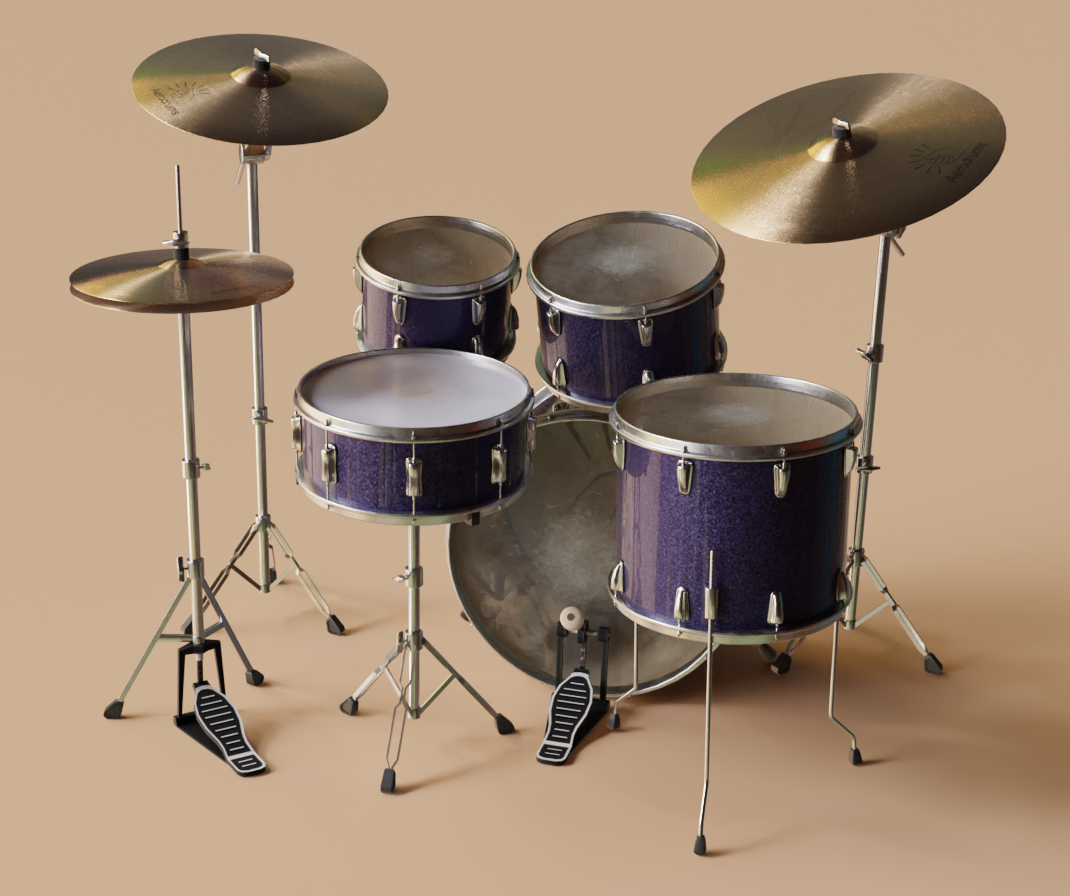
Good news for the Aerodrummers out there who love a five-piece set-up. We’ve now added a beautiful five-piece kit preset, so you can perfect those fills and have fun with the extra tom.
MP4 export support (Win/Mac)
You are now able to export videos files of your Aerodrumming in MP4 format.
This was a much-requested feature and we’ve now rolled it out across Windows and Mac. The Configuration panel now has settings to enable 60 FPS video and motion blur - this improves visual quality (but please note: it slows down video export, so is disabled by default).
Multiple physical pedal support
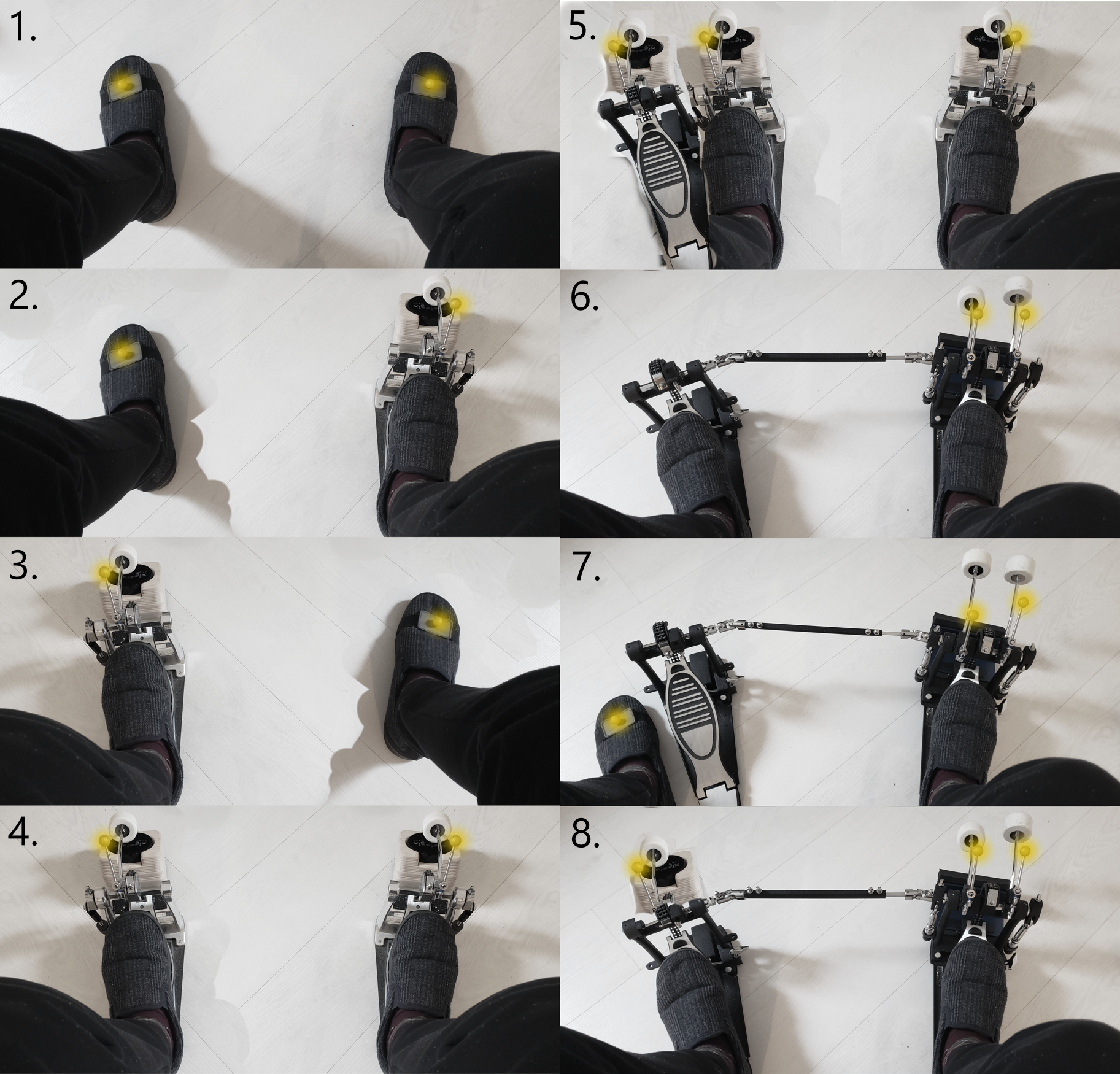
This is probably one for the hardcore Aerodrums 2 users, because it requires hardware beyond what you get in the box; more than one kick pedal, more than one (or a double) reverse-beater kick practice pad, and an additional Aerodrums 2 kick pedal attachment piece.
But... it's so fun!
This image shows the 8 supported configurations where each yellow highlight corresponds to a marker either worn on the foot or attached to a physical pedal beater. Some of the configurations require tracking 3 foot markers. For these, there is a new checkbox in Settings → Feet that needs to be enabled. Slippers are optional...
If you are one of the Aerodrummers making use of this feature - we’d love to see your clips!
File browser support in Files panel (Win/Mac)
Native file browser dialogs are now available on the Windows and macOS versions of the app.
These are used when uploading song files from the Files panel (multi-select and folder select are both supported) and to choose the output file name when exporting recordings as WAV or MP4 files.
Configurable MIDI channel (default channel changed to 10)
The MIDI channel on which MIDI data is output is now configurable from Settings → MIDI.
The default channel has been changed from 1 to 10, which is the standard channel to use for drums.
Ability to disable gestures
In case you didn’t know, Aerodrums 2 recognises gestures to start/stop the playlist and skip to the previous/next song.
But for users in performance situations, they may want to disable gestures to make sure they aren't accidentally triggered. This can now be disabled from the Configuration panel.
Fixed default sounds when adding pieces in Make mode
Previously, when adding new pieces in the drum kit editor, you would start with one of three sounds (kick, snare or hi-hat) regardless of the type of piece. You would then need to edit the piece properties to switch to a more appropriate sound.
This has been fixed so that a ride cymbal now has a ride sound, a floor tom has a floor tom sound, and so on.
Bluetooth auto-connect
Bluetooth auto-connect is now supported and can be toggled from Configuration → Bluetooth.
Upon powering on your Aerodrums 2 device, it will try to connect to whatever personal device you last connected via Bluetooth. This skips the step of having to manually connect your personal device from its Bluetooth settings.
--
Let us know what you think!
Of course, there’s lots more ‘under the hood’ - small bug fixes and enhancements, all with the aim of improving the air-drumming experience.
This page has instructions for how to update the apps, including links to download the new Windows/Mac versions, and links to new pages with the app/firmware changelogs.
Let us know what you think to the latest Aerodrums 2 software, and send us photos and videos of you enjoying the new features. You may even like to enter the Aerodrummer of the Month call-out to show us your skills.
We’re really pleased to roll out a whole host of new features today, as part of our latest Aerodrums 2 software update. Here's an overview of what we've added to the Aerodrumming experience in this update:
Cymbal choking support
We’ve seen lots of Aerodrummers having fun with cymbal choking using Aerodrums 1. Thanks for your patience while we figured out the tech to make this possible in Aerodrums 2!
You can now choke crashes and china cymbals by bringing either drumstick marker to the back of the cymbal, roughly where it would end up if you were to choke the cymbal using your hand.
Choking is enabled by default but can be disabled from Configuration → General.
So, now is the time to perfect that Eye Of The Tiger intro! Watch a demo of cymbal choking on Aerodrums 2 here - and we’d love to see your cymbal choking in action, so please send your videos on social media.
Added standard 5-piece kit preset
Good news for the Aerodrummers out there who love a five-piece set-up. We’ve now added a beautiful five-piece kit preset, so you can perfect those fills and have fun with the extra tom.
MP4 export support (Win/Mac)
You are now able to export videos files of your Aerodrumming in MP4 format.
This was a much-requested feature and we’ve now rolled it out across Windows and Mac. The Configuration panel now has settings to enable 60 FPS video and motion blur - this improves visual quality (but please note: it slows down video export, so is disabled by default).
Multiple physical pedal support
This is probably one for the hardcore Aerodrums 2 users, because it requires hardware beyond what you get in the box; more than one kick pedal, more than one (or a double) reverse-beater kick practice pad, and an additional Aerodrums 2 kick pedal attachment piece.
But... it's so fun!
This image shows the 8 supported configurations where each yellow highlight corresponds to a marker either worn on the foot or attached to a physical pedal beater. Some of the configurations require tracking 3 foot markers. For these, there is a new checkbox in Settings → Feet that needs to be enabled. Slippers are optional...
If you are one of the Aerodrummers making use of this feature - we’d love to see your clips!
File browser support in Files panel (Win/Mac)
Native file browser dialogs are now available on the Windows and macOS versions of the app.
These are used when uploading song files from the Files panel (multi-select and folder select are both supported) and to choose the output file name when exporting recordings as WAV or MP4 files.
Configurable MIDI channel (default channel changed to 10)
The MIDI channel on which MIDI data is output is now configurable from Settings → MIDI.
The default channel has been changed from 1 to 10, which is the standard channel to use for drums.
Ability to disable gestures
In case you didn’t know, Aerodrums 2 recognises gestures to start/stop the playlist and skip to the previous/next song.
But for users in performance situations, they may want to disable gestures to make sure they aren't accidentally triggered. This can now be disabled from the Configuration panel.
Fixed default sounds when adding pieces in Make mode
Previously, when adding new pieces in the drum kit editor, you would start with one of three sounds (kick, snare or hi-hat) regardless of the type of piece. You would then need to edit the piece properties to switch to a more appropriate sound.
This has been fixed so that a ride cymbal now has a ride sound, a floor tom has a floor tom sound, and so on.
Bluetooth auto-connect
Bluetooth auto-connect is now supported and can be toggled from Configuration → Bluetooth.
Upon powering on your Aerodrums 2 device, it will try to connect to whatever personal device you last connected via Bluetooth. This skips the step of having to manually connect your personal device from its Bluetooth settings.
--
Let us know what you think!
Of course, there’s lots more ‘under the hood’ - small bug fixes and enhancements, all with the aim of improving the air-drumming experience.
This page has instructions for how to update the apps, including links to download the new Windows/Mac versions, and links to new pages with the app/firmware changelogs.
Let us know what you think to the latest Aerodrums 2 software, and send us photos and videos of you enjoying the new features. You may even like to enter the Aerodrummer of the Month call-out to show us your skills.